
This Colorado Septic Records Checklist and Permit Lookup page is maintained as conservative homeowner guidance and changes when its state evidence or workflow changes.
CO homeowner guide
Colorado Septic Records Checklist and Permit Lookup
Current verdict
Find the county file before you trust the story.
01
Who holds the file
Open county record lookup paths
02
What to bring
The local permit history, repair notes, and any transfer-of-title inspection record tied to the parcel.
03
Before you price
Colorado Septic Records Checklist and Permit Lookup quote hold: Do not move into quote mode while the parcel, GIS, or records-request trail is still missing.
County records
Already know the county? Go straight to its official record route.
Adams County records All Colorado county pagesColorado records lookup starts with the permit search, county file, or official office path. Colorado records work is less about one statewide file and more about getting the right local public health agency file in hand. If the homeowner cannot surface the Site and Soil Evaluation Report, the permit trail, and any transfer-of-title inspection, the low end is still just a planning story.
Answer at a glance
Colorado records lookup guide
Use this Colorado guide to pick the right office, pull the first file, and jump to a county route when the property location is already known.
Official source: Colorado Department of Public Health and Environment · content reviewed 2026-07-21
| Finding an existing record | Search for the property's permit and supporting documents using its address or parcel number. If no record appears, ask the responsible office to check its archives. |
|---|---|
| Official path | Find Your Local Public Health Agency for OWTS provides official source context. The county instructions above identify the search or request route for an existing property file. |
| County handoff | Local search instructions are available for Adams County records. Choose the property's county to find the relevant office and records route. |
| Proof to pull | The local permit history, repair notes, and any transfer-of-title inspection record tied to the parcel. |
We chase the file. Then make it usable.
Selected full pages from separate completed requests: original agency records, hand-drawn plans, and the brief delivered after review.
01 / RECEIVED FROM THE COUNTY
Swipe to compare the original pages Document 1 of 3
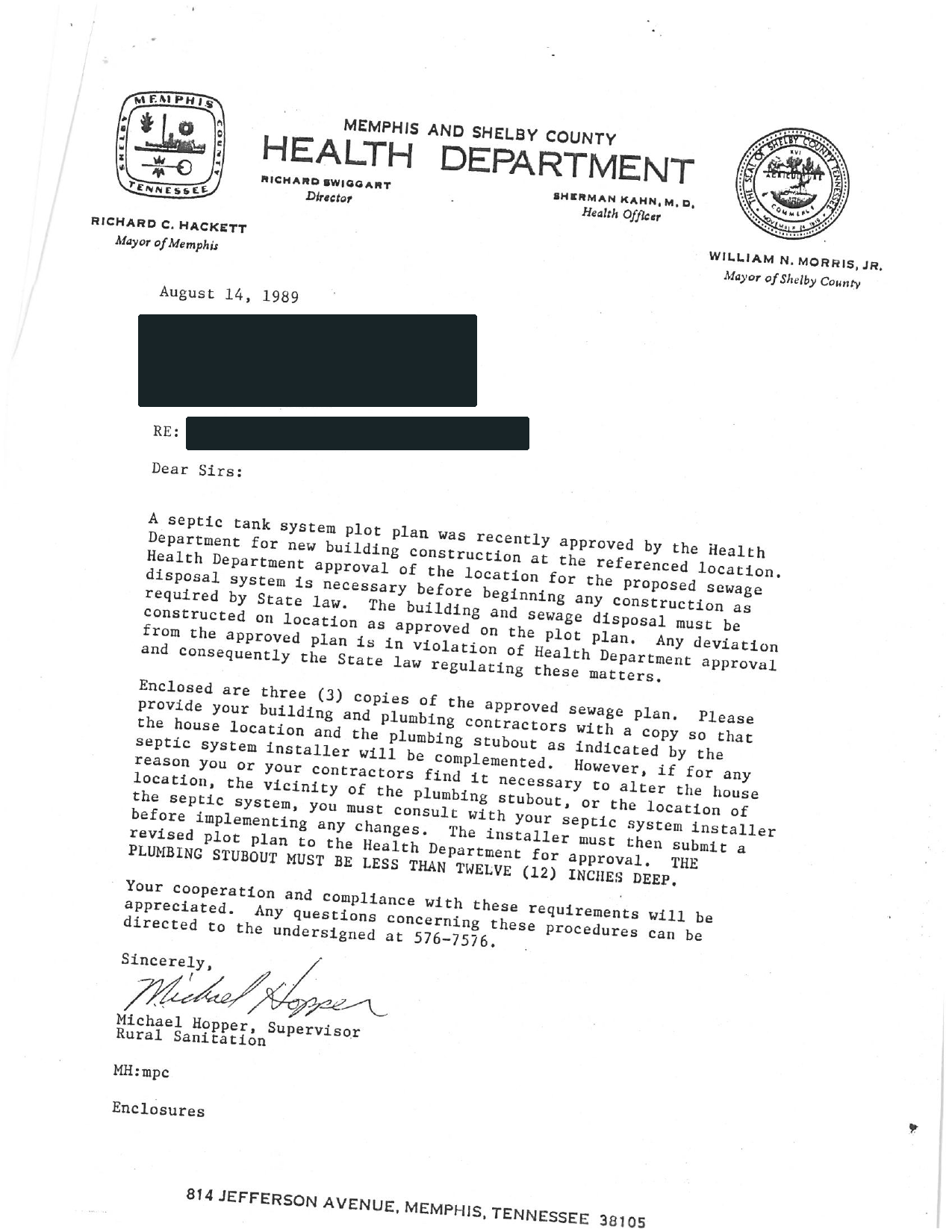
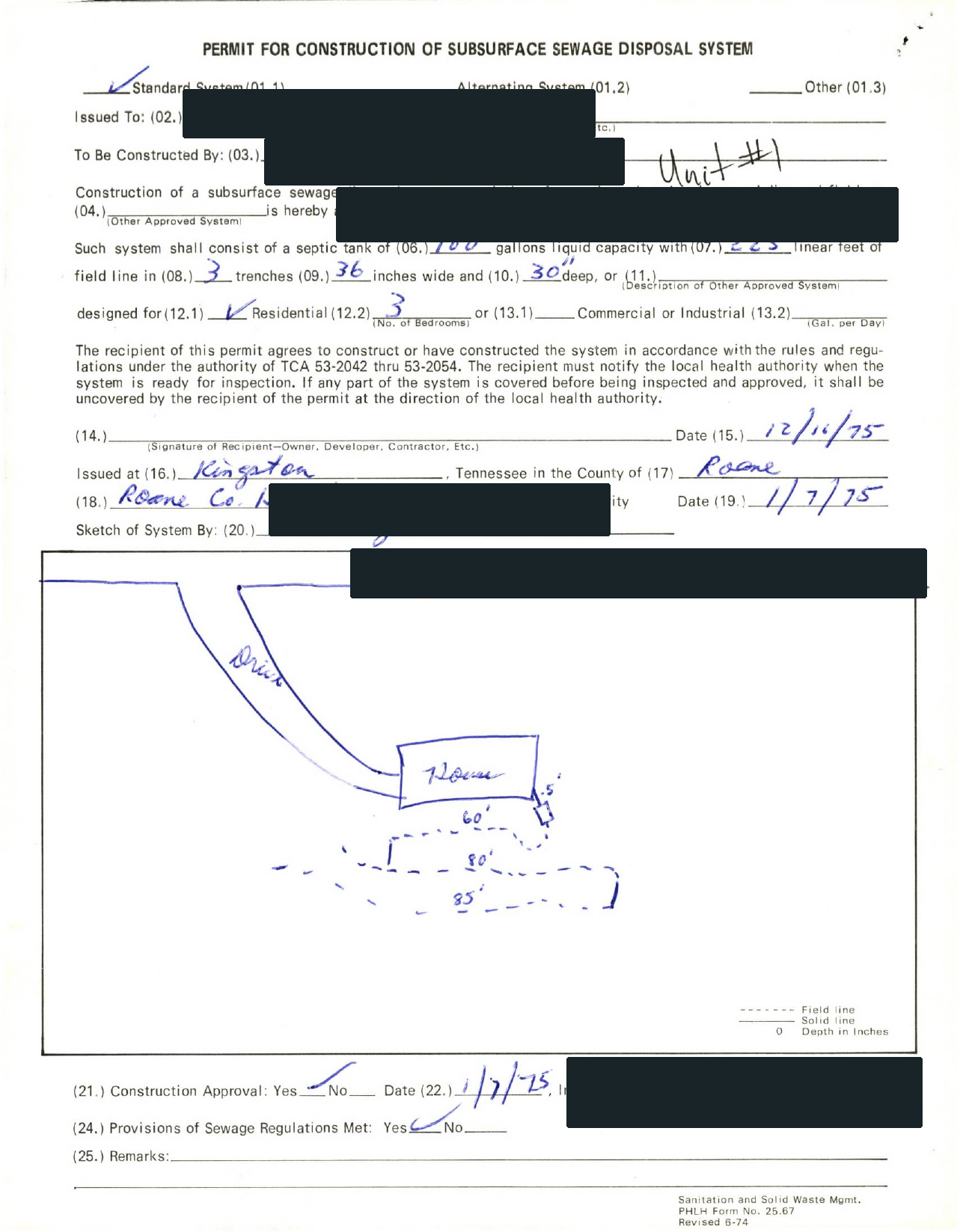
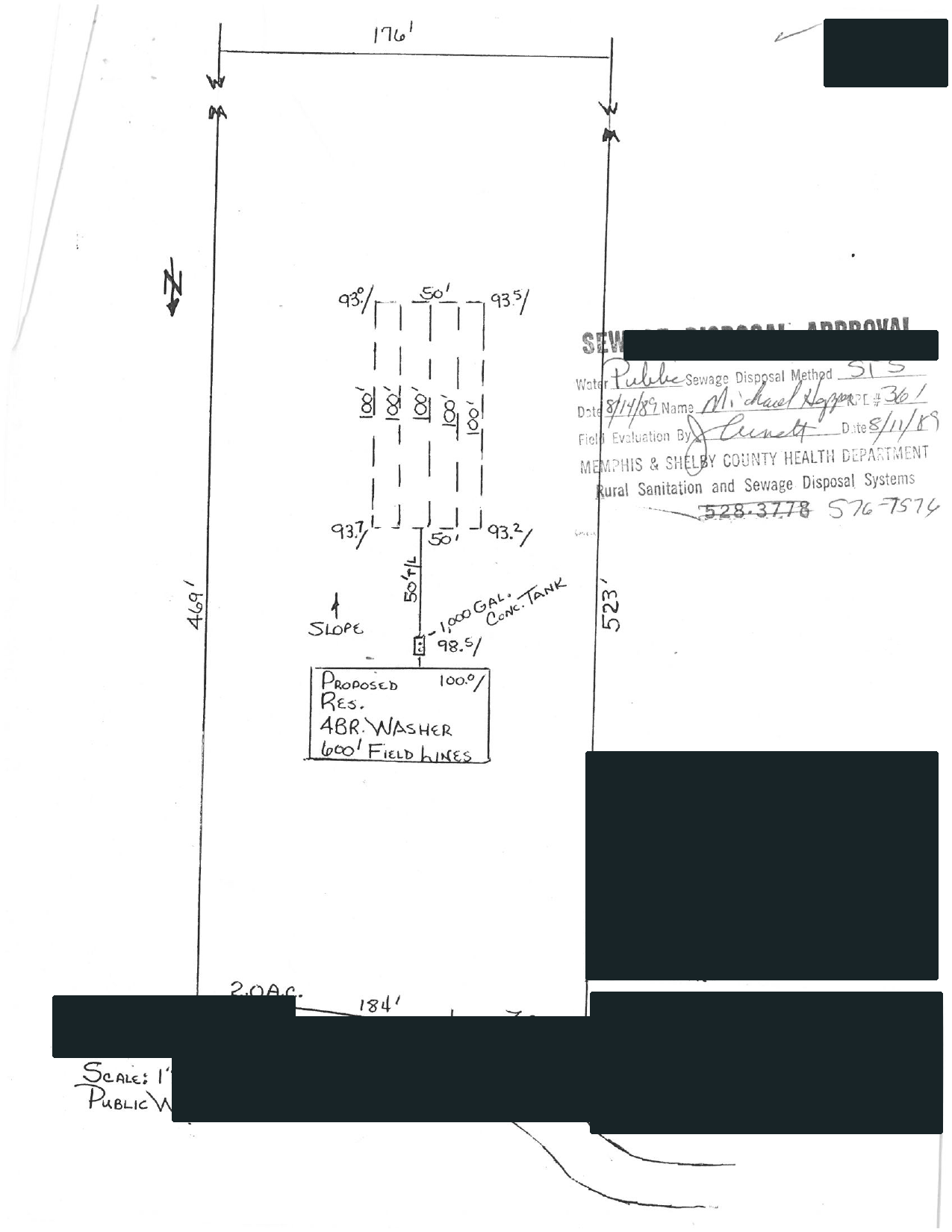
02 / EXPLAINED BY SEPTICPATH
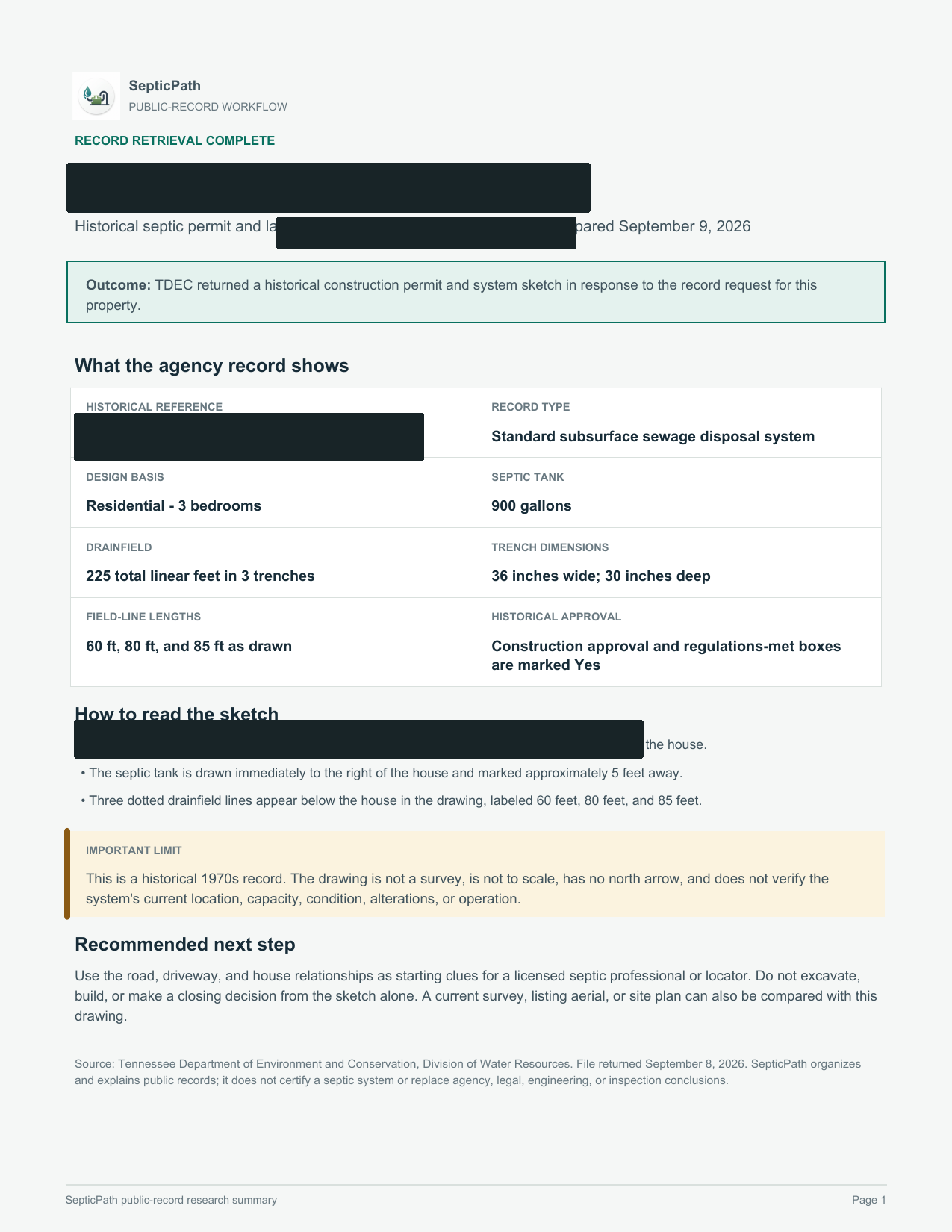
SepticPathRECORD BRIEF
What this helps withA starting point for discussing the layout with a septic professional.
What it does not proveThis is an approved design, not proof of the system’s current location or condition.
Open the delivered brief ↗Privacy reviewed: black bars remove identifying details; agency language, form structure, system data, and drawing geometry remain visible. Samples are from separate requests, not one property file. Record availability varies by property and jurisdiction.
- Search public sources
- Request agency files when needed
- Explain what comes back
Investigate my property
Send the address and what you need to find out.
Records proof ladder
Turn the lookup into the exact file task before pricing.
For Colorado, use these routes when the search needs a parcel lookup, written records request, as-built file, or county page instead of another broad state summary.
Septic permit search by address
Use this Colorado route when the user has an address, parcel, owner, APN, TMS, or legal-description clue and needs the right file owner before the record is treated as missing.
Open address search guideSeptic permit records request
Use this Colorado route when the next move is asking for a permit copy, as-built, final approval, repair file, inspection letter, or written no-record response.
Open records request guideSeptic as-built records
Use this Colorado route when the installed layout, site sketch, tank location, drain field, reserve area, or repair scope can change the next quote or deal decision.
Open as-built records guideSeptic records by county
Use this Colorado route when the county is known and the next useful click is the local permit file, records request, parcel lookup, or office path.
Open county records guide
Official state file path
Use the official file route before another broad search.
This is the Colorado records path to follow when the visitor needs a permit copy, as-built, inspection letter, repair trail, or written no-record response tied to a parcel.
Verification set
Owner, artifact, request, fallback
Colorado Department of Public Health and Environment | Find Your Local Public Health Agency for OWTS. Treat this as the first verification lane, not as proof that every county file is online.
The local permit history, repair notes, and any transfer-of-title inspection record tied to the parcel.
Start with Find Your Local Public Health Agency for OWTS, then use county or regional contact wording if the portal does not show the parcel file.
Colorado Septic Records Checklist and Permit Lookup county trigger: You already have the parcel, address, or owner in hand and the next real move is pulling the county file.
If the Colorado lookup has no match, ask for a written no-record response and the office that owns archived, regional, contract-county, or pre-digital septic files.
Carry the Colorado address, parcel/APN/TMS, owner, legal description, subdivision, and any prior permit number into the next request.
Official records route
Colorado records lookup guide
Use this Colorado guide to pick the right office, pull the first file, and jump to a county route when the property location is already known.
Priority lane
State record lookup and county route handoff
How do I find colorado septic records?
How do I find colorado septic permit lookup?
How do I find colorado county septic records?
How do I find septic permit search by address colorado?
How do I find septic as-built records colorado?
Search for the property's permit and supporting documents using its address or parcel number. If no record appears, ask the responsible office to check its archives.
Find Your Local Public Health Agency for OWTS provides official source context. The county instructions above identify the search or request route for an existing property file.
Local search instructions are available for Adams County records. Choose the property's county to find the relevant office and records route.
The local permit history, repair notes, and any transfer-of-title inspection record tied to the parcel.
Common records searches
Use the Colorado search phrase that matches the job.
Each Colorado route below resolves a different records search into the same practical next step: identify the file owner, pull the permit trail, and then decide whether the record is strong enough to trust.
How do I handle Colorado septic permit lookup?
Start with the official Colorado records or local authority path, then confirm the permit file before trusting a quote, buyer story, or repair plan.
Open records pathHow do I handle Colorado county septic records?
Use this in Colorado when the county file owner, parcel clue, or local records request is the real next step.
Open county records routesFind the office or lookup holding the file
For Colorado Septic Records Checklist and Permit Lookup, use the local office first when you want to move from a planning page into an actual permit or records workflow.
Open local authority sourceOpen the records lookup first
For Colorado Septic Records Checklist and Permit Lookup, use the existing record trail to confirm whether this property still fits the low end before you move into quote mode.
Open records lookupState context Quick facts, fit, and workflow details Open when you need the full state context behind the answer panel.
Quick facts
| Rule style | Site approval workflow | Override risk | high |
|---|---|---|---|
| Last verified | 2026-03-10 | Official sources | 2 |
| Local verification links | 1 | Records links | 1 |
| Public sizing signal | Conservative fallback range | Primary first call | Start with the local public health agency that regulates onsite wastewater systems for the parcel. |
| County-backed first pull | Colorado Septic Records Checklist and Permit Lookup file check: Parcel identifier, address, owner name, or permit number needed to pull the county file. | Hold pricing when | Colorado Septic Records Checklist and Permit Lookup quote hold: Do not move into quote mode while the parcel, GIS, or records-request trail is still missing. |
Records lookup checklist
- Open the local public health agency directory first and confirm which office owns the parcel.
- Ask whether a Site and Soil Evaluation Report, permit history, or transfer-of-title inspection file already exists for the property.
- Confirm whether the job is an install, alteration, repair, or buyer-diligence step before you anchor to the low end.
Who this page is for
Best for Colorado buyers, owners, agents, and builders who know the property uses septic but still need to know whether the file is complete enough to trust the next quote or deal step.
- You know the parcel uses septic, but no one has confirmed which local public health agency actually controls the file. You also need the right records lookup or permit search path before the file story is trustworthy.
- The owner says the system is permitted, but there is still no Site and Soil Evaluation Report or comparable local file in hand.
- You need to know whether local permit triggers and transfer-of-title friction makes the record trail more complicated than the owner remembers.
What changes this page in Colorado
Best for Colorado buyers, owners, agents, and builders who know the property uses septic but still need to know whether the file is complete enough to trust the next quote or deal step. Colorado's records lookup page is strongest when it makes the permit search, county file owner, and missing document explicit. Colorado records intent is strongest when the page connects local public health agency routing, Site and Soil Evaluation Report, and local permit triggers and transfer-of-title friction instead of pretending the state keeps one simple homeowner database.
Colorado Septic Records Checklist and Permit Lookup permit context: Colorado homeowners usually start with the local public health agency because CDPHE says those agencies typically regulate systems with capacities of 2,000 gallons per day or less. The permit path is not trustworthy until the local agency confirms whether site and soil paperwork or transfer-of-title review is already in play. The first practical check is usually the office, file path, or reviewer identified in this state workflow: Start with the local public health agency that regulates onsite wastewater systems for the parcel.
Colorado Septic Records Checklist and Permit Lookup local exception: Colorado's main wrinkle is that CDPHE sets the statewide frame, but the real homeowner workflow usually turns on the local public health agency and whether site, permit, or transfer requirements are already attached to the property. That is why this page pairs a planning estimate with official sources, records links, and a local checklist before you move into quote mode.
Main estimate drivers in Colorado
- Colorado records lookup gets useful only after the permit search, county file owner, or official office path is clear.
- A thin Site and Soil Evaluation Report trail can hide the real approval story behind the current system.
- local permit triggers and transfer-of-title friction can matter as much as the permit copy before the homeowner trusts the low end.
How this workflow usually unfolds in Colorado
- Start with the local public health agency and confirm who actually holds the onsite file for the property.
- Request the Site and Soil Evaluation Report, permit file, approval path, and any transfer-of-title inspection or transfer-related record tied to the parcel.
- Compare the records you received against the property story so you know whether the next step is buyer diligence, permit cleanup, or replacement planning.
- Then move into pricing only after the file is strong enough to trust the current system narrative.
State Pattern Summary How county files usually break down in Colorado These county pages show the local branches that keep repeating in Colorado. This summary is built from 10 live county workflows so you can decide which county file, replacement branch, or failure-side trigger matters before you treat the first cost number like the final answer.
Parcel and records lookup
For Colorado Septic Records Checklist and Permit Lookup, County files often start with parcel, GIS, permit-search, or formal document-request lookup before anyone trusts the seller summary. Ask the Colorado county for For Colorado Septic Records Checklist and Permit Lookup, first ask for parcel identifier, address, owner name, or permit number needed to pull the county file. Seen across 10 live county pages. Examples: Adams County, Boulder County, Douglas County.
Transfer and buyer diligence
For Colorado Septic Records Checklist and Permit Lookup, Buyer and transfer risk often lives in inspection, property-status, PTI, or completion artifacts rather than a generic permit copy. Ask the Colorado county for For Colorado Septic Records Checklist and Permit Lookup, first ask for transfer inspection, property status report, PTI-backed record, or buyer-side completion proof. Seen across 9 live county pages. Examples: Adams County, Boulder County, Douglas County.
Grant and special-program file
For Colorado Septic Records Checklist and Permit Lookup, Some counties add a separate BRF, BAT, Critical Area, or sewer-connection lane that can change both timing and ownership cost. Ask the Colorado county for For Colorado Septic Records Checklist and Permit Lookup, first ask for bRF or BAT application, Critical Area note, sewer-connection alternative, or upgrade-program file. Seen across 1 live county pages. Examples: Boulder County.
Most common file owner pattern
Many county workflows in Colorado are county-first once you reach the named local health or environmental office. Seen in 5 county pages.
Most common permit closeout signal
Colorado county evidence: County files often need a stronger closeout artifact than the first permit mention. Seen in 7 county pages.
Most common buyer or transfer artifact
Colorado county evidence: The most common buyer-side county artifact is a formal transfer, status, or real-estate evaluation record. Seen in 10 county pages.
Most common special program or exception
Colorado county evidence: County pages in this state still need a special-program check even when no single program dominates the workflow. Seen in 7 county pages.
Most common malfunction or repair trail
Colorado county evidence: County pages in this state often move into a repair, malfunction, or off-lot-discharge branch before the low-end scope is real. Seen in 8 county pages.
Most common quote gate
Colorado county evidence: The most common quote gate is a repair, malfunction, or failing-system branch that has to be cleared before pricing is trustworthy. Seen in 8 county pages.
First county artifacts to pull
- Colorado Septic Records Checklist and Permit Lookup file check: Parcel identifier, address, owner name, or permit number needed to pull the county file.
- Colorado Septic Records Checklist and Permit Lookup file check: Transfer inspection, property status report, PTI-backed record, or buyer-side completion proof.
- Colorado Septic Records Checklist and Permit Lookup file check: BRF or BAT application, Critical Area note, sewer-connection alternative, or upgrade-program file.
Drop to a county page when
- Colorado Septic Records Checklist and Permit Lookup county trigger: You already have the parcel, address, or owner in hand and the next real move is pulling the county file.
- Colorado Septic Records Checklist and Permit Lookup county trigger: The real question is closing risk, lender diligence, or inspection leverage rather than basic permit history.
- Colorado Septic Records Checklist and Permit Lookup county trigger: The parcel may be in a Critical Area, failing-system, or upgrade-program lane where grant and replacement rules change the next step.
Do not quote yet when
- Colorado Septic Records Checklist and Permit Lookup quote hold: Do not move into quote mode while the parcel, GIS, or records-request trail is still missing.
- Colorado Septic Records Checklist and Permit Lookup quote hold: Do not jump to quote mode while the buyer or lender still lacks the transfer-side inspection or status artifact.
- Colorado Septic Records Checklist and Permit Lookup quote hold: Do not frame the job as a simple replacement if grant, BAT, Critical Area, or sewer-connection rules might still control the path.
County Wedge
County record pages behind this state workflow
Use these Colorado routes when this Colorado Septic Records Checklist and Permit Lookup page is still too broad and the real blocker is a specific county file, location request, or local records form.
Adams County Colorado Septic Records Checklist and Permit Lookup
Open county pageDouglas County Colorado Septic Records Checklist and Permit Lookup
Open county pagePitkin County Colorado Septic Records Checklist and Permit Lookup
Open county pageEl Paso County Colorado Septic Records Checklist and Permit Lookup
Open county pageMesa County Colorado Septic Records Checklist and Permit Lookup
Open county pageRoutt County Colorado Septic Records Checklist and Permit Lookup
Open county pageMore county pages are available
This Colorado Septic Records Checklist and Permit Lookup page shows the strongest six Colorado county routes first so the workflow stays scannable. Use the state records page when you need the wider county list.
Open all Colorado county routesShow all county page links on this page
Verification layer Prep checks and official sources Open when you need the authority links, records sources, and low-end risk checks.
Start with this file prep
Who to call first. Start with the local public health agency that regulates onsite wastewater systems for the parcel.
Records to request.
- The local permit history, repair notes, and any transfer-of-title inspection record tied to the parcel.
- Any Site and Soil Evaluation Report or equivalent local site-evaluation paperwork already on file.
- The local public health agency's notes on whether the job is treated as install, alteration, repair, or buyer transfer review.
What makes the file less trustworthy in Colorado
State-level checks.
- If the local agency has not confirmed the permit path, the low end is still a planning scenario, not a permit-ready number.
- If a Site and Soil Evaluation Report or transfer inspection points toward more work, the project can widen fast.
- If permit history is missing or inconsistent, buyer and replacement risk can rise before design even starts.
- Colorado looks statewide through CDPHE, but the homeowner workflow changes quickly once you know which local public health agency controls the file and whether site or transfer requirements are already active.
Page-specific checks.
- The low-end file story breaks if no one has identified the local public health agency holding the actual record.
- A missing Site and Soil Evaluation Report can hide a very different system path than the owner summary suggests.
- local permit triggers and transfer-of-title friction can make the file much more demanding than a generic record lookup implies.
Permit timeline watch
Colorado timing often turns on how quickly the local public health agency can review the site-and-soil file and whether a transfer-of-title or repair-history question is already in play.
When the missing file becomes a deal problem
Buyers should ask for local permit history, any transfer-of-title inspection record, and site-evaluation paperwork early because Colorado risk often sits in the local file rather than the seller summary.
Maintenance / inspection note
Colorado's current source set is strongest on local permit routing, transfer-of-title context, and site paperwork, not on one simple statewide pumping cadence.
Special state wrinkle
Colorado's main wrinkle is that CDPHE sets the statewide frame, but the real homeowner workflow usually turns on the local public health agency and whether site, permit, or transfer requirements are already attached to the property.
Bring this into the next records lookup
- The local public health agency identified for the property.
- Any Site and Soil Evaluation Report, permit file, design packet, or approval note already tied to the parcel.
- Any transfer-of-title inspection, transfer, complaint, or follow-up record already in the file.
- A short summary of the real use case: buyer diligence, permit cleanup, replacement planning, or service-history check.
Official file and lookup links
Colorado: Find the office or lookup holding the file.
- Colorado Department of Public Health and Environment Find your local public health agency
Open the records lookup first.
- Colorado Department of Public Health and Environment Find Your Local Public Health Agency for OWTS
- Colorado Department of Public Health and Environment Find Your Local Public Health Agency for OWTS
- Colorado Department of Public Health and Environment Find your local public health agency
FAQ
Colorado questions this page should answer before a quote request.
Who holds Colorado septic records in practice?
Usually the local public health agency, which is the first office to identify before you ask for the Site and Soil Evaluation Report or any transfer paperwork.
Does Colorado have a septic permit lookup?
Use the Colorado records lookup path to find the permit search, county file owner, or official office that can confirm the permit, as-built, inspection, or repair record before quotes.
Turn the records route into a property-file decision
Find the official permit or county file first. If a sale or offer is moving, use the free check to identify the bedroom-count, parcel-match, approval, repair, or missing-record question that still needs an answer.