
This New Jersey Septic Records Checklist and Permit Lookup page is maintained as conservative homeowner guidance and changes when its state evidence or workflow changes.
NJ homeowner guide
New Jersey Septic Records Checklist and Permit Lookup
Current verdict
Find the county file before you trust the story.
01
Who holds the file
Open county record lookup paths
02
What to bring
Recent pumping and inspection history for the current system.
03
Before you price
New Jersey Septic Records Checklist and Permit Lookup quote hold: Do not move into quote mode while the parcel, GIS, or records-request trail is still missing.
County records
Already know the county? Go straight to its official record route.
Gloucester County records Cape May County records All New Jersey county pagesNew Jersey records lookup starts with the permit search, county file, or official office path. New Jersey records are not just a permit-history problem. In Pinelands or advanced-system cases, the real risk lives in inspection certification, board of health reporting, and ongoing maintenance contracts. This page surfaces those documents first.
Answer at a glance
New Jersey records lookup guide
Use this New Jersey guide to pick the right office, pull the first file, and jump to a county route when the property location is already known.
Official source: New Jersey Pinelands Commission · content reviewed 2026-03-09
| Finding an existing record | Search for the property's permit and supporting documents using its address or parcel number. If no record appears, ask the responsible office to check its archives. |
|---|---|
| Official path | Septic System Management provides official source context. The county instructions above identify the search or request route for an existing property file. |
| County handoff | Local search instructions are available for Gloucester County records, Cape May County records. Choose the property's county to find the relevant office and records route. |
| Proof to pull | Recent pumping and inspection history for the current system. |
We chase the file. Then make it usable.
Selected full pages from separate completed requests: original agency records, hand-drawn plans, and the brief delivered after review.
01 / RECEIVED FROM THE COUNTY
Swipe to compare the original pages Document 1 of 3
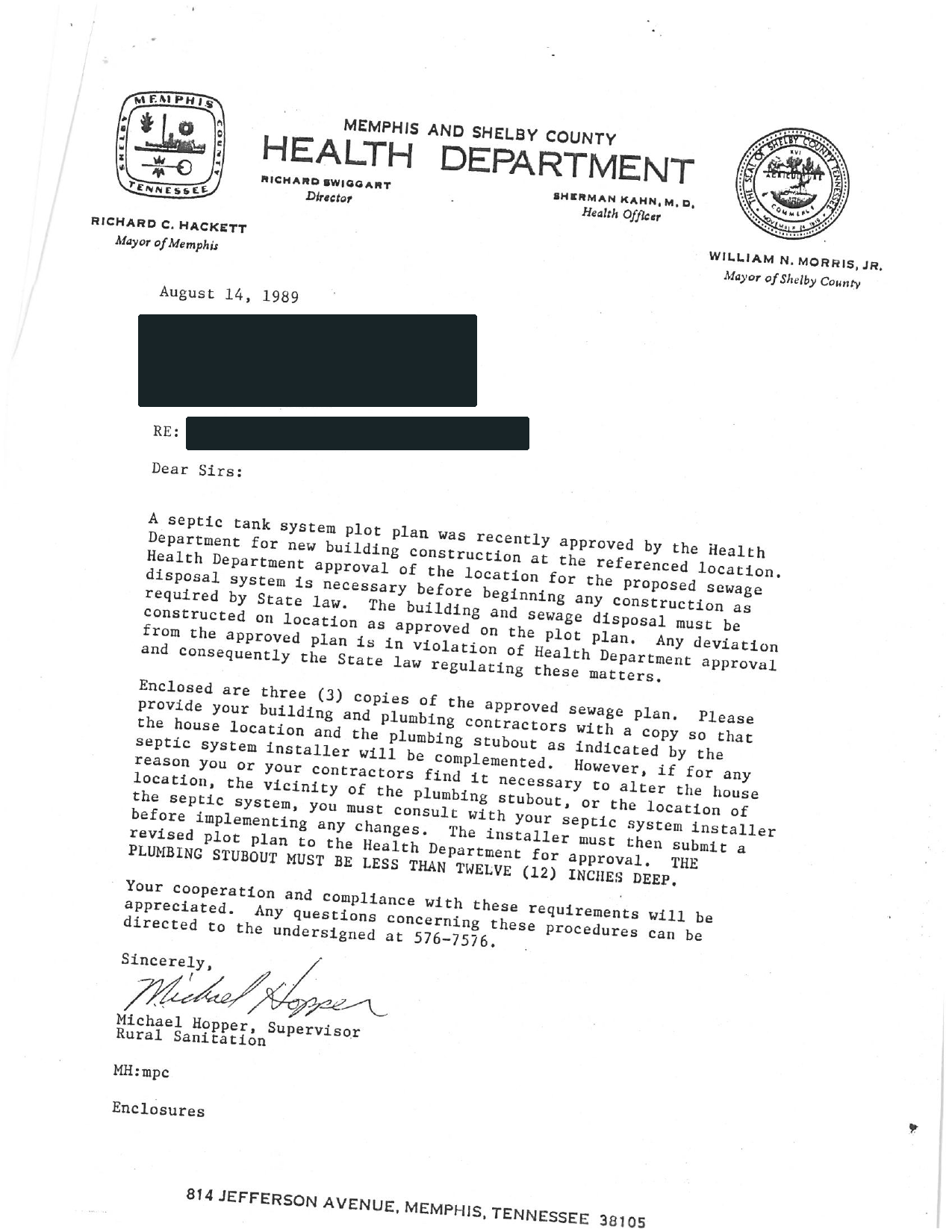
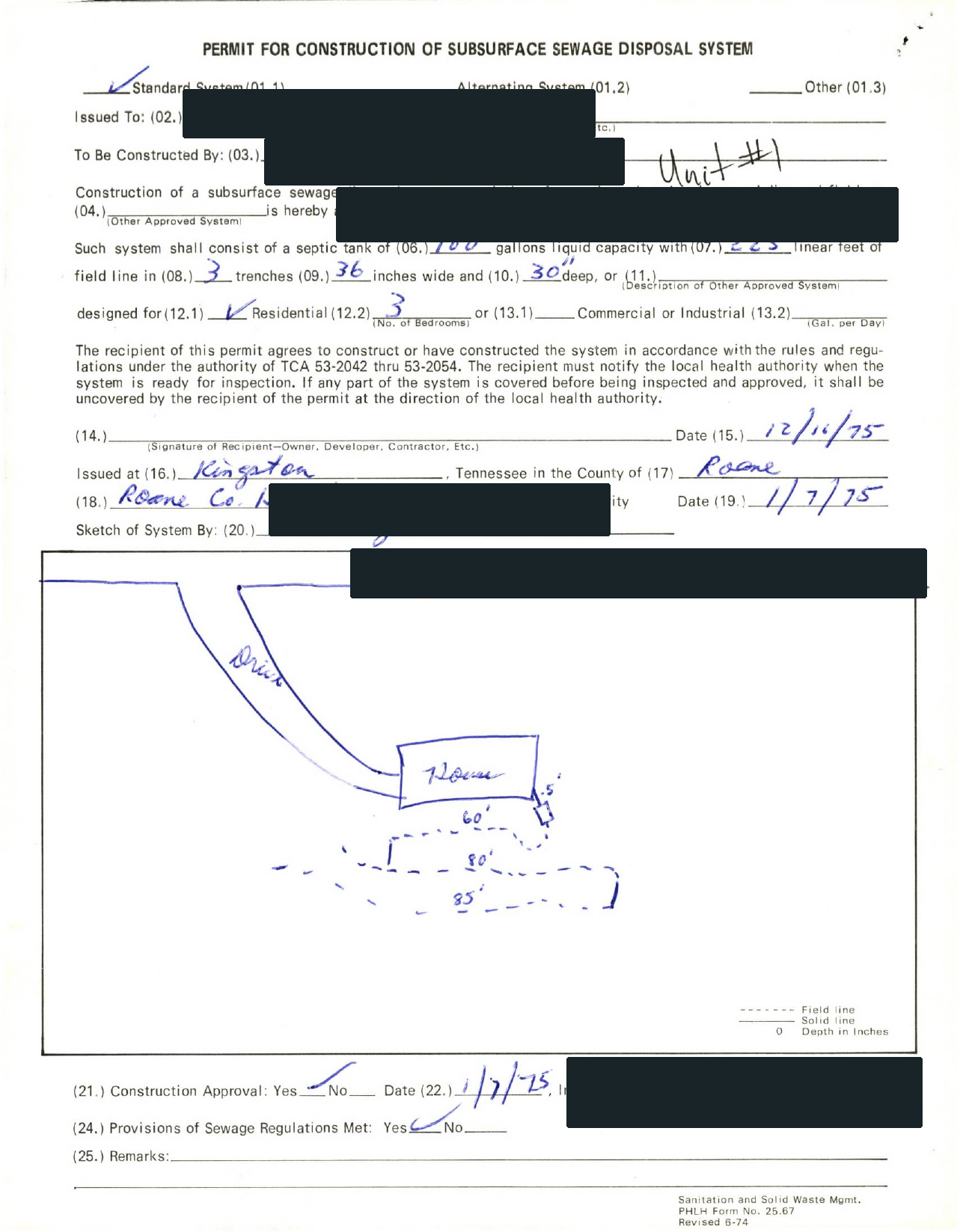
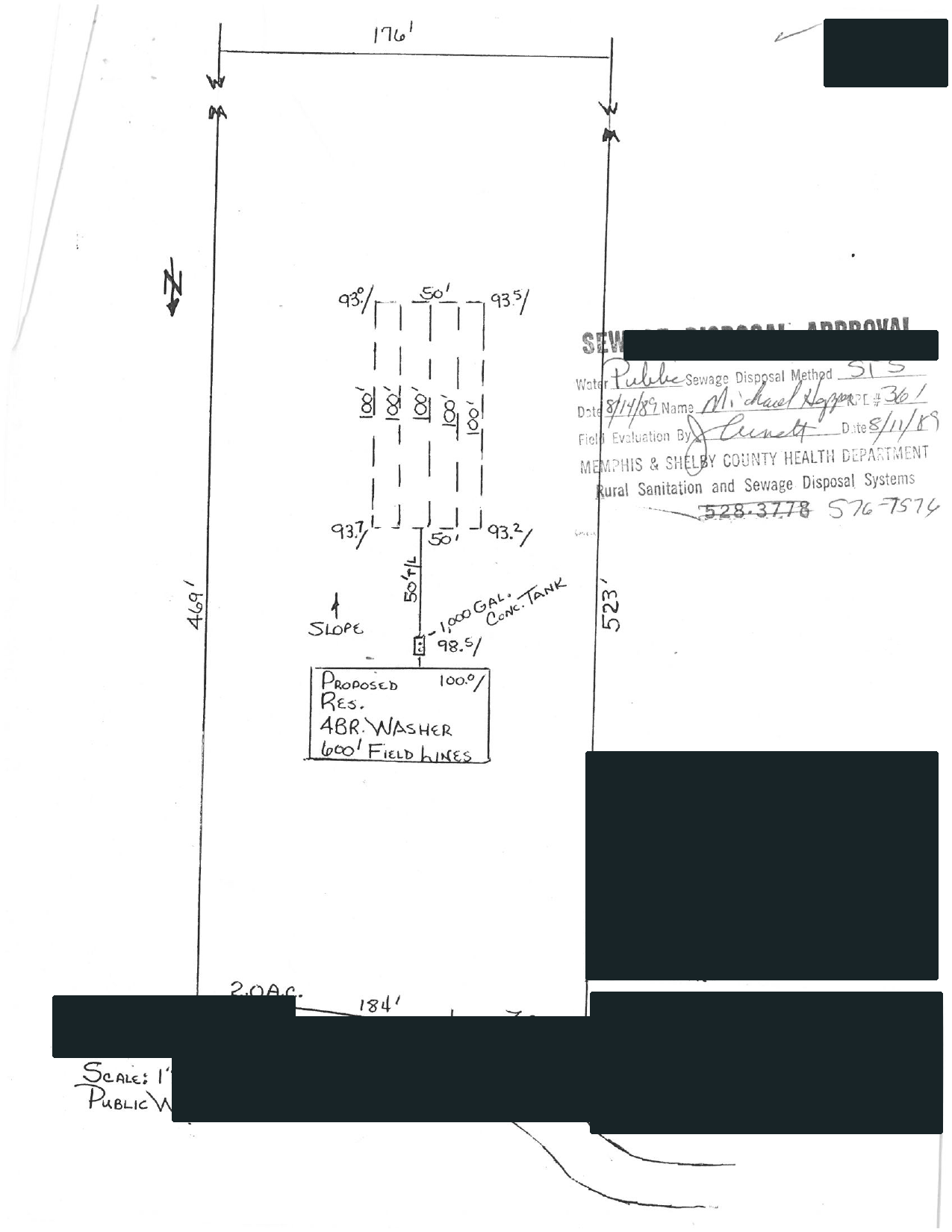
02 / EXPLAINED BY SEPTICPATH
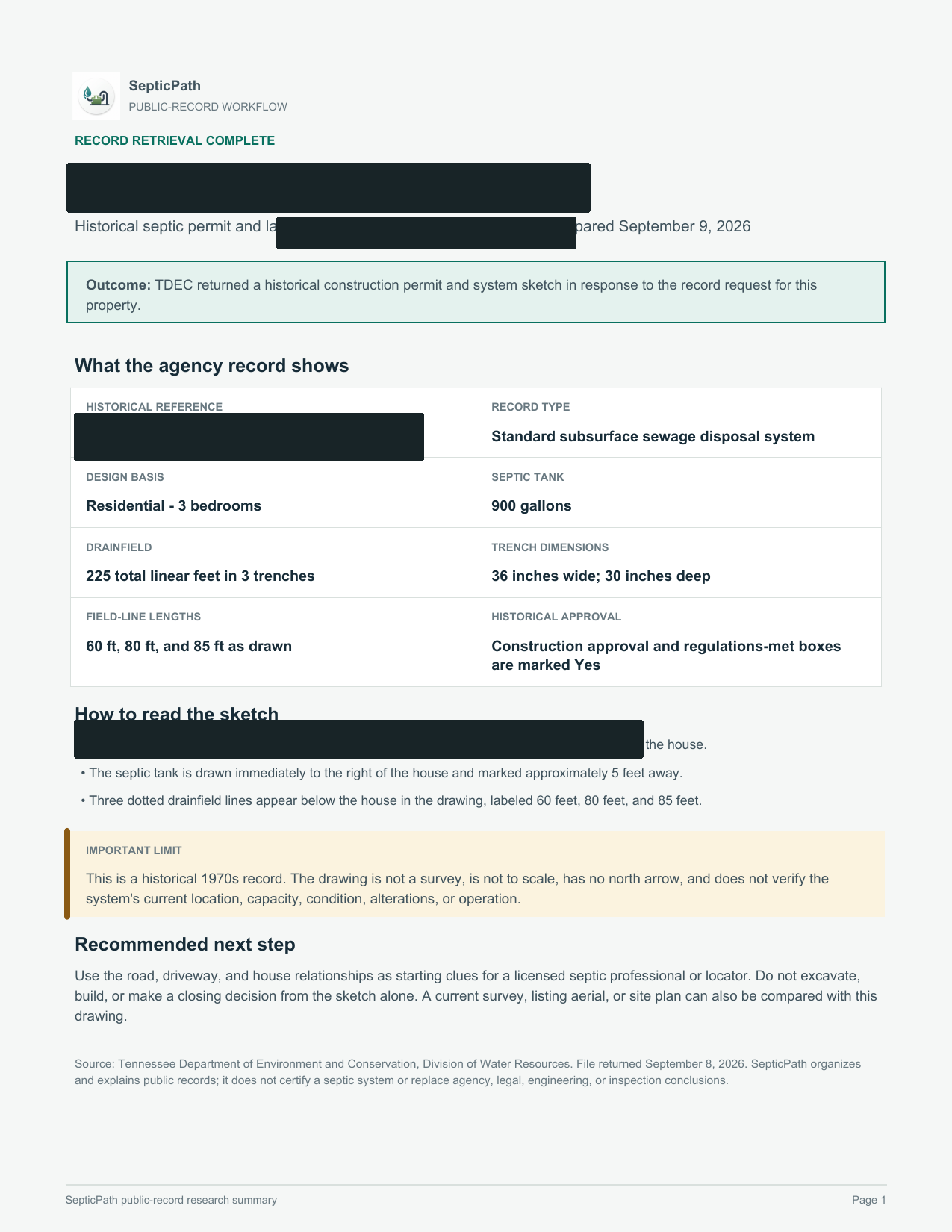
SepticPathRECORD BRIEF
What this helps withA starting point for discussing the layout with a septic professional.
What it does not proveThis is an approved design, not proof of the system’s current location or condition.
Open the delivered brief ↗Privacy reviewed: black bars remove identifying details; agency language, form structure, system data, and drawing geometry remain visible. Samples are from separate requests, not one property file. Record availability varies by property and jurisdiction.
- Search public sources
- Request agency files when needed
- Explain what comes back
Investigate my property
Send the address and what you need to find out.
Records proof ladder
Turn the lookup into the exact file task before pricing.
For New Jersey, use these routes when the search needs a parcel lookup, written records request, as-built file, or county page instead of another broad state summary.
Septic permit search by address
Use this New Jersey route when the user has an address, parcel, owner, APN, TMS, or legal-description clue and needs the right file owner before the record is treated as missing.
Open address search guideSeptic permit records request
Use this New Jersey route when the next move is asking for a permit copy, as-built, final approval, repair file, inspection letter, or written no-record response.
Open records request guideSeptic as-built records
Use this New Jersey route when the installed layout, site sketch, tank location, drain field, reserve area, or repair scope can change the next quote or deal decision.
Open as-built records guideSeptic records by county
Use this New Jersey route when the county is known and the next useful click is the local permit file, records request, parcel lookup, or office path.
Open county records guide
Official state file path
Use the official file route before another broad search.
This is the New Jersey records path to follow when the visitor needs a permit copy, as-built, inspection letter, repair trail, or written no-record response tied to a parcel.
Verification set
Owner, artifact, request, fallback
New Jersey Pinelands Commission | Septic System Management. Treat this as the first verification lane, not as proof that every county file is online.
Recent pumping and inspection history for the current system.
Start with Septic System Management, then use county or regional contact wording if the portal does not show the parcel file.
New Jersey Septic Records Checklist and Permit Lookup county trigger: You already have the parcel, address, or owner in hand and the next real move is pulling the county file.
If the New Jersey lookup has no match, ask for a written no-record response and the office that owns archived, regional, contract-county, or pre-digital septic files.
Carry the New Jersey address, parcel/APN/TMS, owner, legal description, subdivision, and any prior permit number into the next request.
Official records route
New Jersey records lookup guide
Use this New Jersey guide to pick the right office, pull the first file, and jump to a county route when the property location is already known.
Priority lane
State record lookup and county route handoff
How do I find new jersey septic records?
How do I find cape may county septic records?
How do I find gloucester county septic records?
How do I find new jersey septic permit lookup?
How do I find septic as-built records new jersey?
Search for the property's permit and supporting documents using its address or parcel number. If no record appears, ask the responsible office to check its archives.
Septic System Management provides official source context. The county instructions above identify the search or request route for an existing property file.
Local search instructions are available for Gloucester County records, Cape May County records. Choose the property's county to find the relevant office and records route.
Recent pumping and inspection history for the current system.
Common records searches
Use the New Jersey search phrase that matches the job.
Each New Jersey route below resolves a different records search into the same practical next step: identify the file owner, pull the permit trail, and then decide whether the record is strong enough to trust.
How do I handle New Jersey septic permit lookup?
Start with the official New Jersey records or local authority path, then confirm the permit file before trusting a quote, buyer story, or repair plan.
Open records pathHow do I handle New Jersey county septic records?
Use this in New Jersey when the county file owner, parcel clue, or local records request is the real next step.
Open county records routes
Planning cost snapshot
Use these ranges only after the file path is clear.
Find the office or lookup holding the file
For New Jersey Septic Records Checklist and Permit Lookup, use the local office first when you want to move from a planning page into an actual permit or records workflow.
Open local authority sourceOpen the records lookup first
For New Jersey Septic Records Checklist and Permit Lookup, use the existing record trail to confirm whether this property still fits the low end before you move into quote mode.
Open records lookupState context Quick facts, fit, and workflow details Open when you need the full state context behind the answer panel.
Quick facts
| Rule style | Hybrid state and county workflow | Override risk | high |
|---|---|---|---|
| Last verified | 2026-03-09 | Official sources | 4 |
| Local verification links | 2 | Records links | 2 |
| Public sizing signal | Conservative fallback range | Primary first call | Start with the local board of health or local acting authority, especially if the property is in the Pinelands or uses an advanced pretreatment device. |
| County-backed first pull | New Jersey Septic Records Checklist and Permit Lookup file check: Parcel identifier, address, owner name, or permit number needed to pull the county file. | Hold pricing when | New Jersey Septic Records Checklist and Permit Lookup quote hold: Do not move into quote mode while the parcel, GIS, or records-request trail is still missing. |
Records lookup checklist
- Pull the local health department directory before assuming a statewide New Jersey office handles the next step.
- If the property is in the Pinelands or has an advanced device, ask for management and maintenance paperwork immediately.
- Request recent pump-out, inspection, and contract records before pricing the low end.
Who this page is for
Best for New Jersey buyers and owners who suspect the file is bigger than a permit receipt, especially where Pinelands context, advanced treatment, or local board-of-health management obligations may still follow the property after closing.
- The listing mentions an advanced device, alternate design, or sensitive-area context and you do not yet have the management paperwork. You also need the right records lookup or permit search path before the file story is trustworthy.
- The owner says the system is maintained, but no service contract or board-of-health notice is in hand.
- You need to know whether ongoing management obligations make the low-end ownership story incomplete.
What changes this page in New Jersey
Best for New Jersey buyers and owners who suspect the file is bigger than a permit receipt, especially where Pinelands context, advanced treatment, or local board-of-health management obligations may still follow the property after closing. New Jersey's records lookup page is uniquely useful because it captures the long-tail ownership paperwork that generic permit articles ignore.
New Jersey Septic Records Checklist and Permit Lookup permit context: New Jersey uses local boards of health and local wastewater planning structures in practice. Pinelands materials and NJDEP model ordinance language make ongoing maintenance and local oversight unusually important. The first practical check is usually the office, file path, or reviewer identified in this state workflow: Start with the local board of health or local acting authority, especially if the property is in the Pinelands or uses an advanced pretreatment device.
New Jersey Septic Records Checklist and Permit Lookup local exception: Pinelands and alternate design systems create a special-area layer that many national septic pages do not explain. That is why this page pairs a planning estimate with official sources, records links, and a local checklist before you move into quote mode.
Main estimate drivers in New Jersey
- New Jersey records lookup gets useful only after the permit search, county file owner, or official office path is clear.
- Ask for any maintenance contract or service paperwork tied to an advanced or special-area system.
- Pull local approvals or notices showing whether the system is under a management program.
How this workflow usually unfolds in New Jersey
- Start with the local board of health or the Pinelands context, not just the seller disclosure, because New Jersey's practical record risk is often local and ongoing.
- Pull recent inspection and pump-out history and identify whether the current system is conventional, advanced, or in a special management area.
- If the system is advanced or in the Pinelands, ask for service contracts, management paperwork, and any proof already submitted to the board of health.
- Then compare the current quote or purchase story against the long-run maintenance and reporting obligations already attached to the system.
State Pattern Summary How county files usually break down in New Jersey These county pages show the local branches that keep repeating in New Jersey. This summary is built from 12 live county workflows so you can decide which county file, replacement branch, or failure-side trigger matters before you treat the first cost number like the final answer.
Parcel and records lookup
For New Jersey Septic Records Checklist and Permit Lookup, County files often start with parcel, GIS, permit-search, or formal document-request lookup before anyone trusts the seller summary. Ask the New Jersey county for For New Jersey Septic Records Checklist and Permit Lookup, first ask for parcel identifier, address, owner name, or permit number needed to pull the county file. Seen across 12 live county pages. Examples: Atlantic County, Burlington County, Camden County.
File owner and local office split
For New Jersey Septic Records Checklist and Permit Lookup, New Jersey counties often split the real file owner between county health, a municipality, a board of health, or another local office. The first win is identifying the right desk. Ask the New Jersey county for For New Jersey Septic Records Checklist and Permit Lookup, first ask for the exact county, municipal, board-of-health, or CEHA office that actually owns the septic file. Seen across 1 live county pages. Examples: Somerset County.
Permit ladder and closeout file
For New Jersey Septic Records Checklist and Permit Lookup, Many county files are not one permit receipt. They usually widen into permit ladders, operation approvals, completion certificates, or reuse and addition branches. Ask the New Jersey county for For New Jersey Septic Records Checklist and Permit Lookup, first ask for improvement permit, construction authorization, operation permit, sanitary construction permit, or completion certificate. Seen across 1 live county pages. Examples: Hunterdon County.
Most common file owner pattern
Many county workflows in New Jersey split the real file between county health, a municipality, or a local board. Seen in 5 county pages.
Most common permit closeout signal
New Jersey county evidence: County files often need a stronger closeout artifact than the first permit mention. Seen in 4 county pages.
Most common buyer or transfer artifact
New Jersey county evidence: The most common buyer-side county artifact is a formal transfer, status, or real-estate evaluation record. Seen in 5 county pages.
Most common special program or exception
New Jersey county evidence: County pages in this state often turn on a local exception, sewer branch, reserve-area limit, or other area rule before the normal path applies. Seen in 6 county pages.
Most common malfunction or repair trail
New Jersey county evidence: County pages in this state still reward checking the repair or malfunction side before trusting the simplest system story. Seen in 4 county pages.
Most common quote gate
New Jersey county evidence: The most common quote gate is a repair, malfunction, or failing-system branch that has to be cleared before pricing is trustworthy. Seen in 8 county pages.
First county artifacts to pull
- New Jersey Septic Records Checklist and Permit Lookup file check: Parcel identifier, address, owner name, or permit number needed to pull the county file.
- New Jersey Septic Records Checklist and Permit Lookup file check: The exact county, municipal, board-of-health, or CEHA office that actually owns the septic file.
- New Jersey Septic Records Checklist and Permit Lookup file check: Improvement permit, construction authorization, operation permit, sanitary construction permit, or completion certificate.
Drop to a county page when
- New Jersey Septic Records Checklist and Permit Lookup county trigger: You already have the parcel, address, or owner in hand and the next real move is pulling the county file.
- New Jersey Septic Records Checklist and Permit Lookup county trigger: The story mentions a town, local board, or other office that does not sound like the main county file owner.
- New Jersey Septic Records Checklist and Permit Lookup county trigger: The project involves an addition, reuse, repair, or change-of-use instead of a simple existing-system lookup.
Do not quote yet when
- New Jersey Septic Records Checklist and Permit Lookup quote hold: Do not move into quote mode while the parcel, GIS, or records-request trail is still missing.
- New Jersey Septic Records Checklist and Permit Lookup quote hold: Hold off on pricing if the caller still does not know which office actually owns the septic file.
- New Jersey Septic Records Checklist and Permit Lookup quote hold: Do not trust a clean reuse story until the permit ladder and closeout artifact are both visible.
County Wedge
County record pages behind this state workflow
Use these New Jersey routes when this New Jersey Septic Records Checklist and Permit Lookup page is still too broad and the real blocker is a specific county file, location request, or local records form.
Gloucester County New Jersey Septic Records Checklist and Permit Lookup
Open county pageCape May County New Jersey Septic Records Checklist and Permit Lookup
Open county pageSussex County New Jersey Septic Records Checklist and Permit Lookup
Open county pageCamden County New Jersey Septic Records Checklist and Permit Lookup
Open county pageHunterdon County New Jersey Septic Records Checklist and Permit Lookup
Open county pageMiddlesex County New Jersey Septic Records Checklist and Permit Lookup
Open county pageMore county pages are available
This New Jersey Septic Records Checklist and Permit Lookup page shows the strongest six New Jersey county routes first so the workflow stays scannable. Use the state records page when you need the wider county list.
Open all New Jersey county routesShow all county page links on this page
- Monmouth County New Jersey Septic Records Checklist and Permit Lookup
- Ocean County New Jersey Septic Records Checklist and Permit Lookup
- Salem County New Jersey Septic Records Checklist and Permit Lookup
- Somerset County New Jersey Septic Records Checklist and Permit Lookup
- Atlantic County New Jersey Septic Records Checklist and Permit Lookup
- Burlington County New Jersey Septic Records Checklist and Permit Lookup
Verification layer Prep checks and official sources Open when you need the authority links, records sources, and low-end risk checks.
Start with this file prep
Who to call first. Start with the local board of health or local acting authority, especially if the property is in the Pinelands or uses an advanced pretreatment device.
Records to request.
- Recent pumping and inspection history for the current system.
- Any maintenance contract or management paperwork tied to an advanced or special-area system.
- Local approvals or notices that show whether the system falls under a management program.
What makes the file less trustworthy in New Jersey
State-level checks.
- Pinelands and advanced-system management obligations can make the true cost more than a one-time install or replacement bill.
- Ongoing maintenance contract requirements can erase the apparent low end.
- Local board of health oversight can materially change the practical project path.
- New Jersey needs a strong local disclaimer because board of health practice, wastewater management plans, and special-area programs like the Pinelands can materially change the homeowner path.
Page-specific checks.
- Missing service contracts or management-program paperwork can hide ongoing cost that never appears in a one-time install or replacement quote.
- Pinelands or advanced-system obligations can make the property more expensive to own than the visible inspection record suggests.
- If the board of health record trail is incomplete, the buyer cannot assume the current ownership story is fully compliant.
Permit timeline watch
New Jersey timing is often shaped by local board of health management obligations rather than by a simple one-time permit clock.
When the missing file becomes a deal problem
Buyers should request inspection, pump-out, and maintenance-contract records early, especially in the Pinelands or with advanced pretreatment devices.
Maintenance / inspection note
Pinelands guidance says conventional systems are inspected and certified once every three years, while some advanced devices must carry perpetual service contracts.
Special state wrinkle
Pinelands and alternate design systems create a special-area layer that many national septic pages do not explain.
Bring this into the next records lookup
- Recent inspection and pump-out history for the current system.
- Any maintenance contract, service agreement, or proof-of-service paperwork for advanced devices.
- Board of health notices, management-program records, or Pinelands paperwork tied to the property.
- A clear note on whether the system is conventional, advanced, or in a special-area management path.
Official file and lookup links
New Jersey: Find the office or lookup holding the file.
- New Jersey Department of Health Local Health Departments
- New Jersey Department of Environmental Protection Septic Management Model Ordinance
Open the records lookup first.
- New Jersey Pinelands Commission Septic System Management
- New Jersey Department of Health Local Health Departments
- New Jersey Department of Environmental Protection Septic Systems
- New Jersey Pinelands Commission Septic System Management
- New Jersey Department of Environmental Protection Septic Management Model Ordinance
- New Jersey Pinelands Commission Alternate Design Septic System Program
FAQ
New Jersey questions this page should answer before a quote request.
What is the biggest record risk in New Jersey?
Missing maintenance-contract or management-program paperwork can hide ongoing costs the buyer did not price in.
Does New Jersey have a septic permit lookup?
Use the New Jersey records lookup path to find the permit search, county file owner, or official office that can confirm the permit, as-built, inspection, or repair record before quotes.
Turn the records route into a property-file decision
Find the official permit or county file first. If a sale or offer is moving, use the free check to identify the bedroom-count, parcel-match, approval, repair, or missing-record question that still needs an answer.